Skip to content
GateCoreAI

Product

Control before execution. Evidence afterward.

GateCore checks an agent's identity, permissions, policy, and authorized price before a routed request reaches your API. Your team can review the decision and verify the signed record.

Talk through a workflow Read the docs

Operator consoleExample data
GateCore operator console example, showing a request awaiting an operator decision

An interface example. Not evidence of a production request.

How it works

Six stages, with clear decision points.

A request can be allowed, held for configured review, or denied. A review approval releases that hold; remaining checks still apply when processing resumes.

  1. 01 · VERIFY

    Check the signed request.

    Verify the request signature, freshness, replay state, registered key, and agent grant.

  2. 02 · RESOLVE

    Resolve identity and scope.

    Resolve the agent, grant, and allowed capabilities from server-side records rather than trusting caller-supplied identity.

  3. 03 · DECIDE

    Apply configured policy.

    Evaluate the request against configured policy. The result can allow, hold for review, or deny.

  4. 04 · CHECK PRICE

    Honor the signed maximum.

    Check the request's signed per-request maximum price and applicable funding path before configured-provider execution.

  5. 05 · EXECUTE

    Call the configured provider.

    Call the API behind the capability through its configured provider connection. The provider enforces access at the resource.

  6. 06 · RECORD

    Issue signed evidence.

    Sign a record of the request, decision, and observed result. Your team can verify the record and compare the result with its recorded digest.

For a paid transaction, applicable settlement records the economic outcome. An authorization or a demonstration alone is not evidence that funds settled. Pricing and usage details.

Operator Console

Review a held purchase.

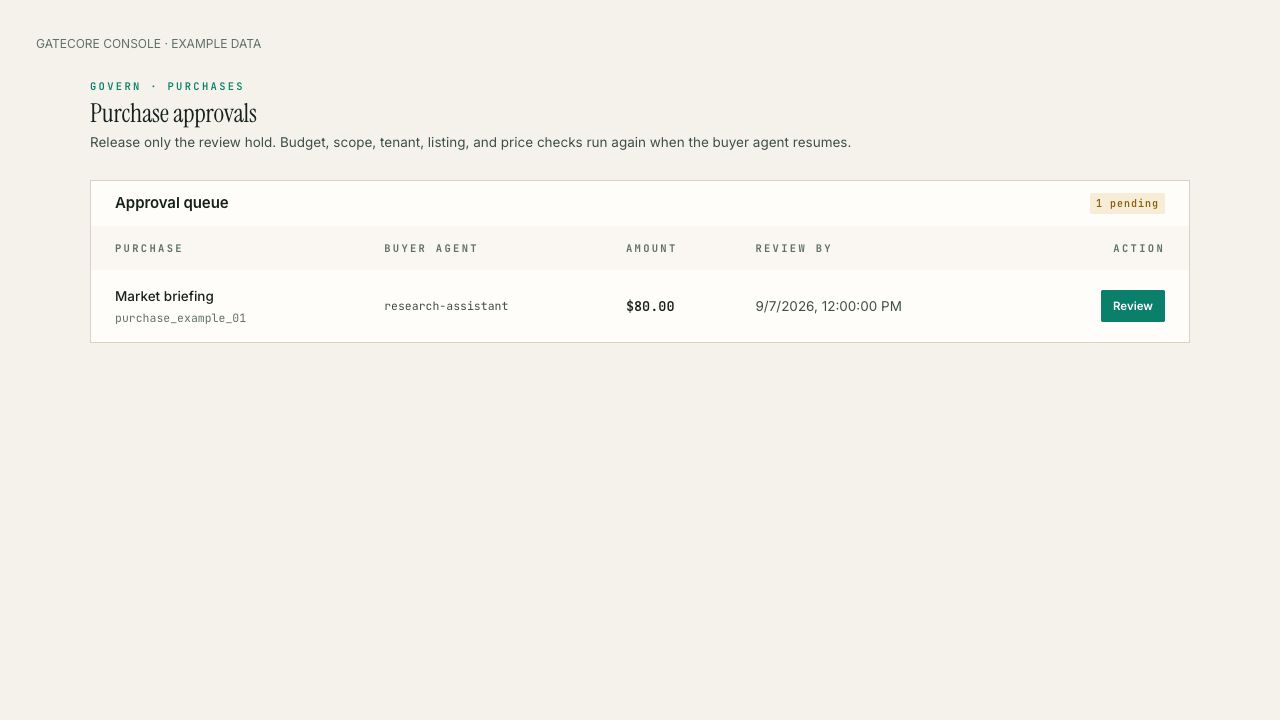
Operators can inspect the purchase, agent, amount, and review deadline in the approval queue. Approving clears the review hold; the request continues through remaining checks.

Example GateCore purchase approval queue showing a market-briefing request awaiting review.
Illustrative interface with example data. It does not show a live customer transaction. Open full image
For buyers and providers

Different teams set different terms.

Buyer teams

Delegate within configured limits.

Configure agent grants, capabilities, spending policy, and review thresholds for requests routed through GateCore.

  • Identity and grant-scope checks
  • Policy decisions and optional human review
  • Signed evidence for requests and observed results
Providers and tool owners

Publish terms for a configured route.

Describe the capability, input contract, price, and access terms that a buyer can discover. Configure how requests reach the provider and enforce authorization at the protected resource.

  • Machine-readable listing terms
  • Configured provider integration
  • Evidence associated with requests GateCore observes
Components

Three parts of the workflow.

GateCore Gateway

Checks signed identity, grant scope, configured policy, and signed per-request maximum price before configured-provider execution; records the observed result.

Operator Console

Configure policy, review held actions, and inspect decisions and associated costs.

Marketplace + MCP Connector

Lets compatible, configured clients discover published terms and submit requests through the connected workflow.

MCP connection

Connect a configured MCP client.

Discovery of published terms may be public. Accessing protected capabilities requires the configured client, identity, grant, and provider-side authorization for that route.

MCP CLIENT CONFIG
{
  "mcpServers": {
    "gatecore": {
      "url": "https://mcp.gatecoreai.com/mcp"
    }
  }
}

ENDPOINT https://mcp.gatecoreai.com/mcp

Connection guide · Quickstart · Developer docs

Evidence

What a receipt can show.

A signed receipt can be independently checked for its signature and bound request/result canonical-JSON hashes. That supports verification of the signed record's integrity; it does not prove an unobserved action did not happen or establish a target's real-world outcome.

Open the receipt verifier Review the recorded local demo evidence

Getting started

Scope a route, then configure it.

Start with one provider workflow: identify the resource and routes to protect, configure the client and provider integration, register identity and grants, set policy and price limits, and confirm the evidence your team expects. Deployment and provider access depend on the selected configuration.

01
Choose a capability
Define its permitted inputs, outputs, and resource boundary.
02
Configure the route
Connect a compatible client, identity and grants, and the provider integration.
03
Set policy
Choose scopes, review thresholds, and any per-request price limit.
04
Exercise outcomes
Review allowed, held, denied, and provider-failure paths.
05
Check the evidence
Verify a receipt and test resource-side access behavior.

Read the quickstart · Discuss an integration

Product film

See the workflow in motion.

The film is an illustrative product presentation. For the bounded local recorded-demo evidence and its limitations, review the demo evidence.